Quiz Entry - updated: 2026.10.22
To allow working from home, F adds a Citrix gateway (step 3). Where is it placed, what does it do, and what does it add to the architecture?
It sits in a DMZ of F between the internet and the Citrix servers. It converts the special Citrix desktop protocol (ICA) to and from HTTPS and adds better authentication via an identity provider (IdP). The result is a multiple, improved perimeter security with an application gateway.
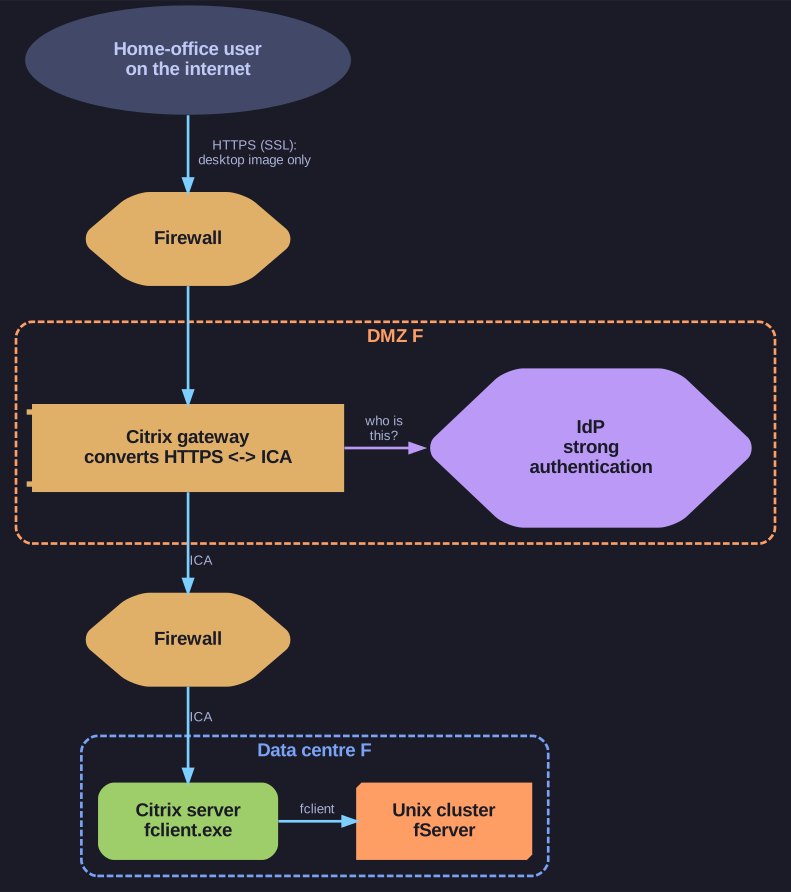
* The home user reaches only the gateway in the DMZ; it authenticates them and translates HTTPS to ICA for the Citrix server. *
The gains, from the internet inwards:
- SSL/TLS security on the internet leg: the home user's connection is ordinary HTTPS, which passes any network and is encrypted.
- No data, only desktop transfer: as in the office, the home PC receives only the screen image, never the finance data.
- Protocol conversion ICA ↔ HTTPS: the internet never talks ICA to the Citrix server directly; the gateway is the only place where the two meet. This is the application gateway (converter) pattern.
- High-quality authentication: the gateway checks the user against an identity provider (an IdP, the service that verifies identities and issues logins) before forwarding anything, typically with multi-factor authentication.
Go deeper:
 Independent Computing Architecture (ICA) — Wikipedia — the Citrix remote-display protocol the gateway converts.
- NetScaler — Wikipedia — the product line the Citrix gateway now belongs to (NetScaler Unified Gateway for remote access to virtual desktops).
- Identity provider — Wikipedia — the service the gateway asks before letting a user in.