Question
On an ESP32 dev board, why can't you wire a peripheral to just any GPIO pin? Which pins are restricted?
Answer
Some pins are already taken or behave specially: GPIO6-11 connect to the module's flash chip, GPIO34-39 are input only, GPIO0/2/5/12/15 are strapping pins that set the boot mode, GPIO1/3 are the serial port used for flashing, and the ADC2 pins stop working as analog inputs while Wi-Fi is on.
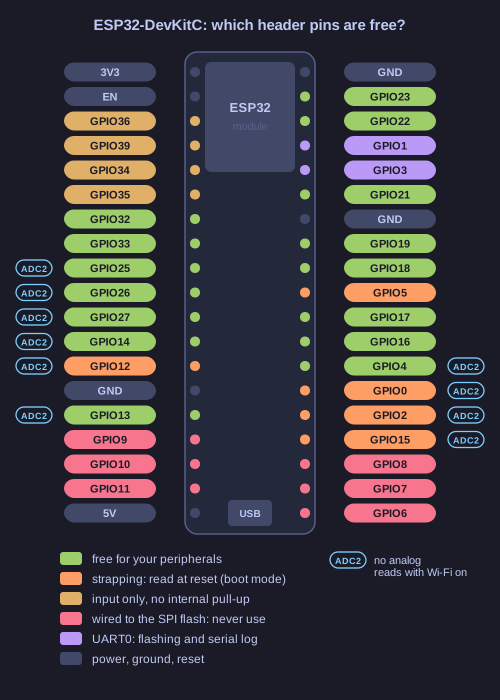
* Both headers of the ESP32-DevKitC, coloured by what each pin is already used for. *
| Pins | Restriction | What goes wrong if you ignore it |
|---|---|---|
| GPIO6-11 | Wired to the SPI flash that holds the program | Using them crashes the chip, because the CPU can no longer read its code |
| GPIO34-39 | Input only, no internal pull-up or pull-down | They cannot drive an LED; a button needs an external resistor |
| GPIO0, 2, 5, 12, 15 | Strapping pins, read once at reset to choose the boot mode and flash voltage | A circuit that pulls one the wrong way at power-on stops the board from booting or flashing |
| GPIO1, GPIO3 | UART0 TX/RX, used by the flasher and the serial monitor | Your device and the log output fight over the line |
| ADC2 pins (GPIO0, 2, 4, 12-15, 25-27) | The Wi-Fi driver uses ADC2 | Analog reads fail once Wi-Fi starts; use the ADC1 pins (GPIO32-39) instead |
The pin diagram marks these with symbols (the ! next to the flash pins, "GPIO input only", the STRAP and ADC labels), and the label on the board header (IO5, D2, CMD) is the only link from the chip's GPIO number to the physical pin. Strapping pins differ in how much they matter. GPIO0 and GPIO2 choose between running the program and waiting for new firmware, and GPIO12 sets the flash voltage, so a wrong level there breaks booting. GPIO5 only sets the timing of the SDIO slave interface, which a normal boot from flash ignores, so it can drive an LED.
Go deeper:
 ESP-IDF — GPIO driver (ESP32) — the official list of strapping, flash, input-only and ADC2 pins.
- Random Nerd Tutorials — ESP32 Pinout Reference — a practical table of which pins are safe to use for what.
- Wikipedia — General-purpose input/output — what a GPIO pin is electrically, and why pins are multiplexed between functions.
Note saved — thanks!
Question
What are the main security and networking challenges specific to edge computing with constrained devices?
Answer
Protecting data at rest, in motion and in use, on hardware whose resource budget can restrict cryptography and transport choices — which is why lightweight primitives and UDP can be useful design choices.
The data-centred challenges first:
- Data storage — readings must be securely stored both on the device and in the cloud: encryption of data at rest.
- Data transmission — the link must be secured: encryption of data in motion.
- Data usage — data is fed into analytical processing and potentially fused with information from other sources to derive actionable insights. This is the sneaky one: the fusion can create sensitivity that no individual reading had.
- Privacy — preserving mechanisms are needed from the start, not retrofitted.
Then the constraint-driven ones:
- Security for resource-constrained edge devices — the umbrella problem.
- Lightweight cryptographic primitives, where the energy budget and computational power make conventional implementations too costly.
- Software and firmware updates, which must work in the field.
- Networking — UDP can reduce transport overhead; where TCP fits, it remains an option. Choose DTLS or TLS to match the transport.
- End-to-end security and privacy across all of the above.
Tip: the data-usage point is the one people skip. A stream of household electricity readings is dull; fused with a calendar it reveals when the house is empty. Ask not only "is this reading sensitive?" but "what does it become when combined?"
Go deeper:
- NIST — Lightweight Cryptography project — the concrete answer to the lightweight-primitives requirement: the Ascon family, selected in 2023 and standardised as SP 800-232.
- RFC 7925 — TLS and DTLS profiles for IoT — shows how established transport security and credential types are adapted to constrained devices.
Note saved — thanks!