Question
What is the difference between an absolute path and a relative path?
Answer
An absolute path starts at the root / and works from anywhere; a relative path starts from wherever you currently are.
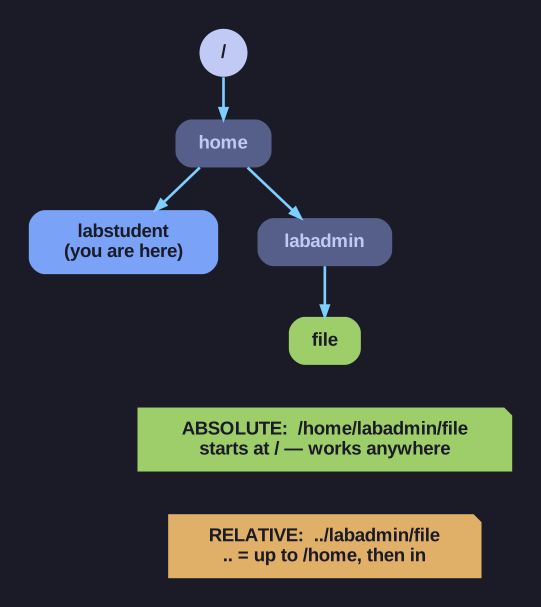
* Standing in labstudent, the same file is reached by an absolute path from / or a relative path through ... *
The single giveaway is the leading slash. If a path begins with /, the shell reads it from the top of the tree — unambiguous, location-independent. If it doesn't, the shell silently glues it onto your current directory, so the same text means different files depending on where you're standing.
| Type | Begins with | Example |
|---|---|---|
| Absolute | / |
/home/labstudent/file |
| Relative | a name, ., or .. |
../labadmin/file |
Three special references make relative paths powerful:
.— the current directory..— the parent directory (one level up)~— your home directory
Same target, two ways, standing in /home/labstudent:
cat /home/labadmin/file   # absolute: works from anywhere
cat ../labadmin/file      # relative: go up to /home, then into labadmin
When to use which: reach for absolute paths in scripts and config files, where you can't predict the working directory and a wrong guess is a bug. Reach for relative paths when typing interactively near your target — they're shorter and faster. The trade-off is robustness vs. brevity.
Note saved — thanks!
Question
What are the string comparison operators in Bash test?
Answer
Strings use symbol operators: = (equal), != (not equal), plus -z (empty) and -n (non-empty).
Note the split-brain design: strings use =/!=, numbers use -eq/-ne. Mixing them is a common bug — [ "$a" -eq "$b" ] errors if the values aren't integers. The -z/-n checks are invaluable for validating input: -z "$var" is true when the variable is empty or unset, perfect for "did the user pass an argument?"
| Operator | Meaning | Example |
|---|---|---|
= |
Equal | [ "$a" = "$b" ] |
== |
Equal (same as =) | [ "$a" == "$b" ] |
!= |
Not equal | [ "$a" != "$b" ] |
-z |
Zero length (empty) | [ -z "$str" ] |
-n |
Non-zero length | [ -n "$str" ] |
Examples:
name="admin"

if [ "$name" = "admin" ]; then
    echo "Welcome admin"
fi

if [ -z "$name" ]; then
    echo "Name is empty"
fi

if [ -n "$name" ]; then
    echo "Name is set: $name"
fi
Always quote variables:
# Correct
[ "$var" = "value" ]

# WRONG - breaks if var is empty
[ $var = "value" ]     # Becomes [ = "value" ] - syntax error!
Note saved — thanks!