Quiz Entry - updated: 2026.10.22
What are the main parts of a SAML authentication assertion, and what does each tell the service provider?
Issuer (who says it), Signature (proof it is genuine and unmodified), Subject (who it is about, and how the bearer is confirmed), Conditions (when and for whom it is valid) and AuthnStatement (when and how the user logged in).
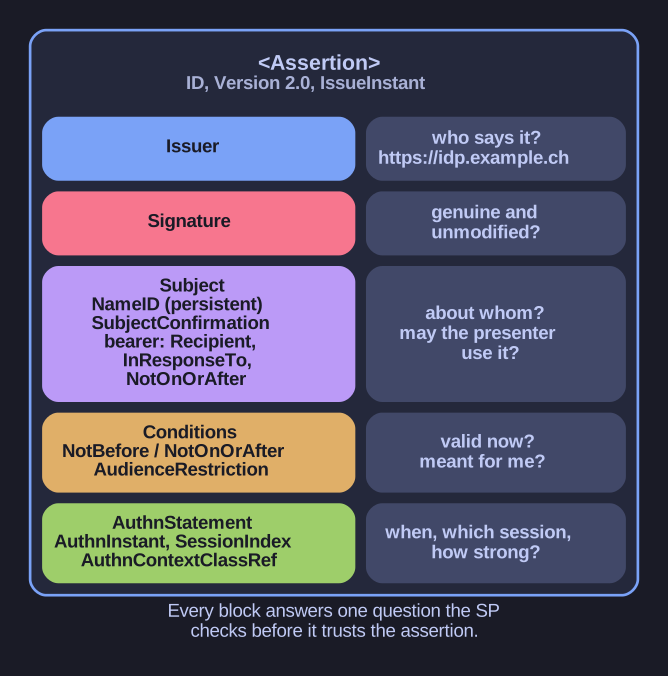
* An authentication assertion: every block answers one question the SP must check before trusting it. *
A trimmed real example:
<saml:Assertion ID="ojqx-mlhj-xydg-xdew" Version="2.0" IssueInstant="2019-12-05T09:23:59Z">
  <saml:Issuer>https://idp.example.ch</saml:Issuer>
  <ds:Signature>...</ds:Signature>
  <saml:Subject>
    <saml:NameID Format="urn:oasis:names:tc:SAML:2.0:nameid-format:persistent">3f7b3dcf-...</saml:NameID>
    <saml:SubjectConfirmation Method="urn:oasis:names:tc:SAML:2.0:cm:bearer">
      <saml:SubjectConfirmationData NotOnOrAfter="2019-12-05T09:33:59Z"
          Recipient="https://rp.gov.ch/SAML/ACS/Browser" InResponseTo="mkqs-ezew-qplo-snrt"/>
    </saml:SubjectConfirmation>
  </saml:Subject>
  <saml:Conditions NotBefore="2019-12-05T09:23:59Z" NotOnOrAfter="2019-12-05T09:33:59Z">
    <saml:AudienceRestriction><saml:Audience>https://rp.gov.ch</saml:Audience></saml:AudienceRestriction>
  </saml:Conditions>
  <saml:AuthnStatement AuthnInstant="2019-12-05T09:23:50Z" SessionIndex="234122">
    <saml:AuthnContext>
      <saml:AuthnContextClassRef>https://stiam.gov.ch/aa/level3</saml:AuthnContextClassRef>
    </saml:AuthnContext>
  </saml:AuthnStatement>
</saml:Assertion>
| Part | Question it answers |
|---|---|
Issuer |
Which IdP made this claim? (Must be one the SP trusts.) |
Signature |
Was it really made by that IdP, and is it unmodified? |
Subject / NameID |
Which user is it about? |
SubjectConfirmation |
How can the SP be sure the presenter is entitled to use it? |
Conditions |
Is it valid now, and is it meant for me? |
AuthnStatement |
When, in which session and with what strength did the login happen? |
Go deeper:
 SAML 2.0: Assertions (Wikipedia) — a full assertion walked through element by element.
 OneLogin SAML developer tools — decode, validate and inspect real SAML messages and assertions.