Quiz Entry - updated: 2026.10.22
How does the OpenID Connect authorization code flow run, step by step?
(0) RP prepares the request, (1) redirect and authentication request to the auth endpoint, (2) OP authenticates the user and gets consent, (3) redirect with the code back to the RP, (4) code exchanged at the token endpoint for access, refresh and ID token, (5) RP validates the ID token, (6) optionally fetches claims from UserInfo.
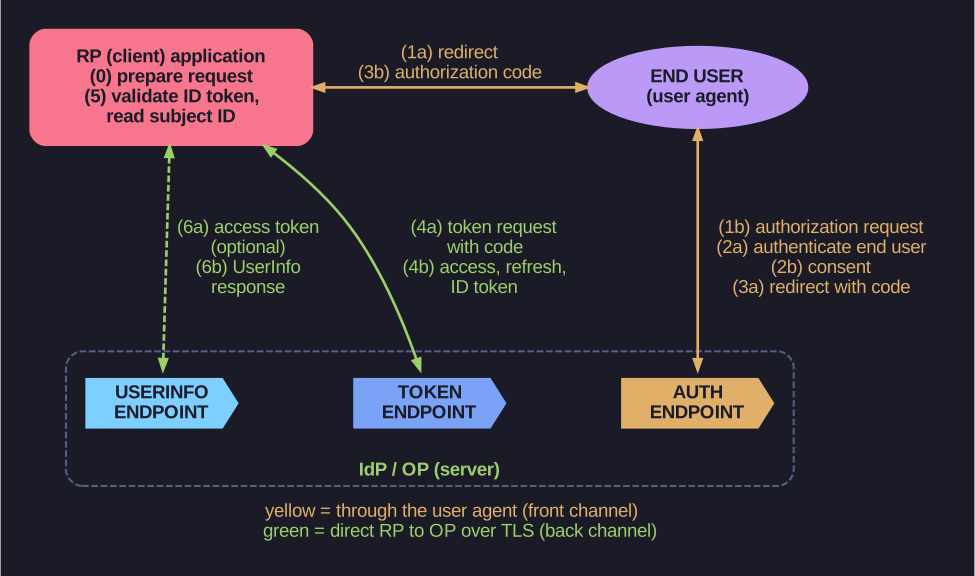
* The browser carries the request and the code; tokens and claims travel directly between the RP and the OP. *
- Prepare: a user wants a resource at
client.example.org; the RP has no session for them and builds an authorization request. - a) Redirect: the RP answers with
302 Foundtohttps://server.example.com/authorize?response_type=code&scope=openid%20profile%20email&client_id=...&state=...&redirect_uri=.... b) Authentication request: the browser follows it to the OP's authorization endpoint. c) The OP must validate the request. - a) Authenticate: the OP authenticates the user. b) Consent: the OP obtains the user's authorisation.
- a) Redirect with code: the OP sends the browser back to
https://client.example.org/cb?code=...&state=...(orerror=...on failure). b) The RP must validate the response, includingstate. - a) Token request (back channel, TLS mandatory): the RP POSTs
grant_type=authorization_code, the code and the redirect URI to the token endpoint, authenticating with its client ID and secret. b) Token response: the OP validates the request and returnsaccess_token,token_type: Bearer,refresh_token,expires_inandid_token. - Validate: the RP validates the ID token and access token and reads the user's subject identifier (
sub). - a) (Optional) UserInfo request with the access token over TLS. b) The OP returns the user's claims.
Go deeper:
 OpenID Connect Core 1.0: Authentication using the Authorization Code Flow — the normative steps with the same example messages.
 OpenID Connect Playground — run the flow against a real provider and inspect each request, code and token.
 OktaDev: An Illustrated Guide to OAuth and OpenID Connect — a short animated walk through the flow.