How does Ansible authenticate to managed hosts, and how do you set up key-based SSH login?
By default over SSH with the user's private key, picked up automatically; ask_pass switches to password login. For keys: generate a pair with ssh-keygen, then copy the public key to each host with ssh-copy-id, or let a playbook do the copying.
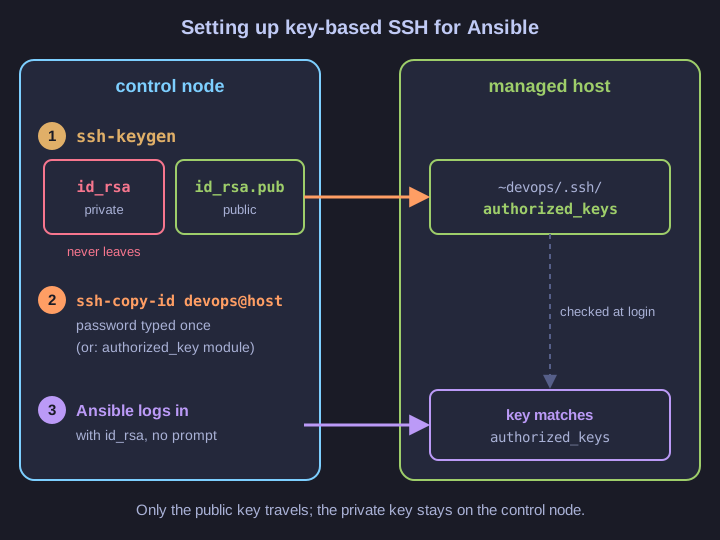
* The private key stays on the control node; only the public key travels to the hosts. *
- Generate:
ssh-keygencreates a private key (for example~/.ssh/id_rsa) and the matching public key (id_rsa.pub) on the control node. - Distribute:
ssh-copy-id devops@host.example.comappends the public key to~devops/.ssh/authorized_keyson the host. You type the password once. - Use: Ansible now logs in as
devopswith the private key, no prompt needed, which is what unattended automation requires.
Doing step 2 by hand for 200 servers defeats the point, so the copy is itself automated with a playbook:
- name: Deploy public key to all hosts
  hosts: all
  tasks:
    - name: Copy public SSH key
      ansible.posix.authorized_key:
        user: devops
        key: "{{ lookup('ansible.builtin.file', '~/.ssh/id_rsa.pub') }}"
        state: present
The lookup reads the public key file on the control node and the module makes sure it is present in that user's authorized_keys. (That first run still needs a password, for example with --ask-pass.) A specific key file can be set in ansible.cfg with private_key_file = /path/to/key.
Go deeper:
 authorized_key module (official docs) — options and examples for distributing keys.
- What is ssh-copy-id? (SSH Academy) — what the command does on the remote side.
- ssh-keygen (Wikipedia) — key types and the files it creates.