How does an RP-initiated logout work in OpenID Connect?
The RP first destroys its own session and browser data, then redirects the browser to the OP's logout endpoint with the ID token as id_token_hint and a post_logout_redirect_uri; the OP ends the user's session, revokes the tokens and redirects the browser back to that URI.
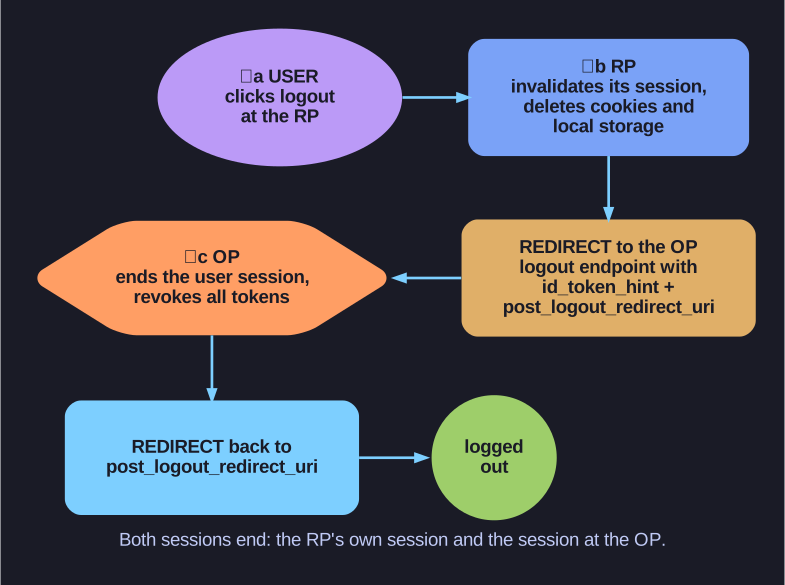
* Logging out of the application alone is not enough: the session at the OP must end too, or the next login would happen silently. *
-
a) The user initiates logout at the client (RP). b) The RP invalidates its user session and cleans up all session data in the browser (cookies, HTML5 local storage...). It then redirects the browser to the OP:
GET https://server.example.com/oidc/logout?id_token_hint=<previously issued ID token>
    &post_logout_redirect_uri=https://app1.example/oidc/logged_out&state=<random>
Sending the ID token is recommended (it tells the OP which session and client this is); the return URL is required so the OP knows where to send the user. c) The OP terminates the user's session and revokes the corresponding tokens. It then redirects the browser to the given URL, which tells the user the logout succeeded.
Why the second half matters: if the RP only deleted its own cookie, the user would still have a session at the OP, and clicking "log in" again would sign them straight back in without a password, which is a problem on shared computers.
Naming note: this redirect-through-the-browser variant is RP-initiated logout. Back-channel logout is a different mechanism, in which the OP sends a signed logout token directly server to server to every RP where the user has a session.
Go deeper:
 OpenID Connect RP-Initiated Logout 1.0 — the logout request parameters and OP behaviour.
- OpenID Connect Back-Channel Logout 1.0 — the server-to-server variant with logout tokens.