Quiz Entry - updated: 2026.10.22
How does an application typically authenticate a user against an LDAP directory and then decide what the user may do?
"Search, then bind": the application binds with its own service account, searches the user's entry by login name to find the DN, then binds as that DN with the typed password; if this succeeds it reads the user's groups to authorise.
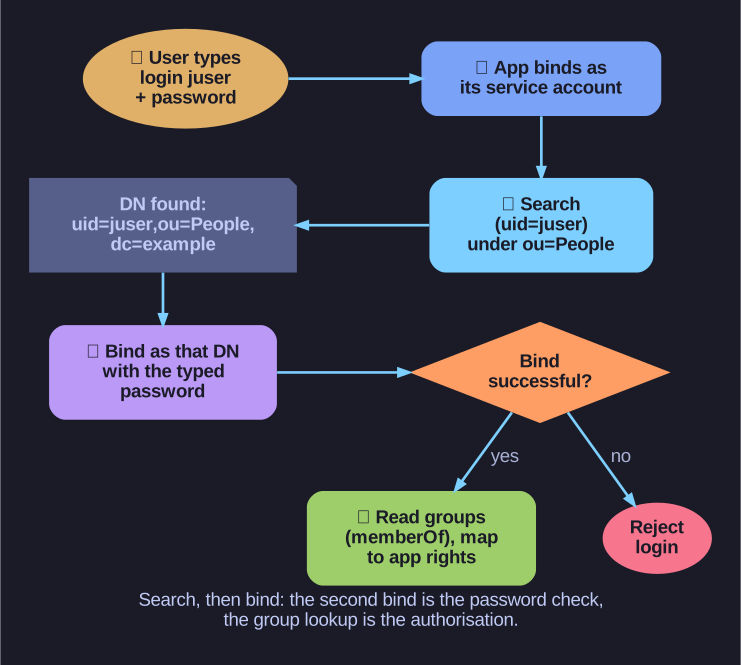
* Authentication is the second bind; authorisation comes from the group data the directory returns. *
- Bind as service account: the application authenticates itself with a low-privilege DN.
- Search: filter
(uid=juser)belowou=People,...to find the user's full DN. Users only know their login name, not their DN. - Bind as the user: a simple bind with the found DN and the password the user typed. Success means the password is correct; the directory compared it with the stored hash, the application never sees the hash.
- Authorise: read
memberOfor search groups with(member=<user DN>), then map groups such as "Admins" or "Developers" to rights in the application.
This is how VPN gateways, wikis, ticket systems and many web applications use one central account store, so a user has one password and leaving the company means disabling a single entry. The connection must be protected by TLS, and the empty-password check must be in place.
Go deeper:
 LDAP.com: The LDAP bind operation — what a successful or failed bind tells the application.
- OWASP: LDAP Injection Prevention Cheat Sheet — how to build the search filter in step 2 safely from user input.