How do RADIUS and LDAP work together to authenticate users on a corporate WLAN?
The access point forwards the login to a RADIUS server (AAA: authentication, authorisation, accounting), and the RADIUS server checks the user's credentials and group membership directly in the LDAP directory before telling the access point to admit or reject the device.
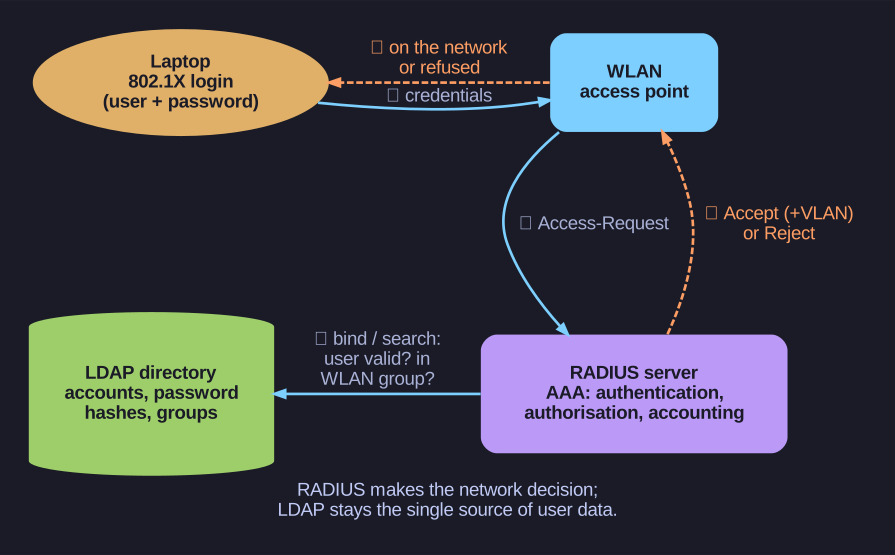
* The access point never sees the directory: RADIUS sits in between and asks LDAP. *
RADIUS (Remote Authentication Dial-In User Service) offers authentication, authorisation and accounting (AAA) plus policy management for wired and wireless network access. Its job is the network decision; it does not want to keep its own user list. So:
- The laptop connects to the WLAN (typically WPA2/WPA3-Enterprise with 802.1X) and presents the user's credentials.
- The access point relays them to the RADIUS server.
- The RADIUS server has direct access to the LDAP data and checks the user: account exists and is enabled, password correct, member of the "WLAN-Staff" group.
- RADIUS answers Access-Accept (possibly with a VLAN assignment) or Access-Reject.
Once on the network, the same user can obtain Kerberos tickets to use all further services securely without entering the password again.
Go deeper:
 RADIUS (Wikipedia) — the AAA protocol, its packet types and how it hands user lookups to a back-end store.